Hotfix release available: 2026-07-14c "Mort".
upgrade now! [57.3] (what's this?)
Hotfix release available: 2026-07-14b "Mort".
upgrade now! [57.2] (what's this?)
Hotfix release available: 2026-07-14a "Mort".
upgrade now! [57.1] (what's this?)
New release available: 2026-07-14 "Mort".
upgrade now! [57] (what's this?)
Hotfix release available: 2025-05-14b "Librarian".
upgrade now! [56.2] (what's this?)
Hotfix release available: 2025-05-14a "Librarian".
upgrade now! [56.1] (what's this?)
New release available: 2025-05-14 "Librarian".
upgrade now! [56] (what's this?)
Hotfix release available: 2024-02-06b "Kaos".
upgrade now! [55.2] (what's this?)
Hotfix release available: 2024-02-06a "Kaos".
upgrade now! [55.1] (what's this?)
New release available: 2024-02-06 "Kaos".
upgrade now! [55] (what's this?)
Hotfix release available: 2023-04-04b "Jack Jackrum".
upgrade now! [54.2] (what's this?)
Hotfix release available: 2023-04-04a "Jack Jackrum".
upgrade now! [54.1] (what's this?)
New release available: 2023-04-04 "Jack Jackrum".
upgrade now! [54] (what's this?)
Hotfix release available: 2022-07-31b "Igor".
upgrade now! [53.1] (what's this?)
Hotfix release available: 2022-07-31a "Igor".
upgrade now! [53] (what's this?)
New release available: 2022-07-31 "Igor".
upgrade now! [52.2] (what's this?)
New release candidate 2 available: rc2022-06-26 "Igor".
upgrade now! [52.1] (what's this?)
New release candidate available: 2022-06-26 "Igor".
upgrade now! [52] (what's this?)
Hotfix release available: 2020-07-29a "Hogfather".
upgrade now! [51.4] (what's this?)
New release available: 2020-07-29 "Hogfather".
upgrade now! [51.3] (what's this?)
New release candidate 3 available: 2020-06-09 "Hogfather".
upgrade now! [51.2] (what's this?)
New release candidate 2 available: 2020-06-01 "Hogfather".
upgrade now! [51.1] (what's this?)
New release candidate available: 2020-06-01 "Hogfather".
upgrade now! [51] (what's this?)
Hotfix release available: 2018-04-22c "Greebo".
upgrade now! [50.3] (what's this?)
Hotfix release available: 2018-04-22b "Greebo".
upgrade now! [50.2] (what's this?)
Hotfix release available: 2018-04-22a "Greebo".
upgrade now! [50.1] (what's this?)
New release available: 2018-04-22 "Greebo".
upgrade now! [50] (what's this?)
Hotfix release available: 2017-02-19g "Frusterick Manners".
upgrade now! [49.7] (what's this?)
Hotfix release available: 2017-02-19f "Frusterick Manners".
upgrade now! [49.6] (what's this?)
Hotfix release available: 2017-02-19e "Frusterick Manners".
upgrade now! [49.5] (what's this?)
Hotfix release available fixing CVE-2017-12979 and CVE-2017-12980: 2017-02-19d "Frusterick Manners".
upgrade now! [49.4] (what's this?)
Hotfix release available fixing CVE-2017-12583: 2017-02-19c "Frusterick Manners".
upgrade now! [49.3] (what's this?)
Hotfix release available fixing security token and media manager: 2017-02-19b "Frusterick Manners".
upgrade now! [49.2] (what's this?)
Hotfix release available fixing install and media manager issues: 2017-02-19a "Frusterick Manners".
upgrade now! [49.1] (what's this?)
New release available: 2017-02-19 "Frusterick Manners".
upgrade now! [49] (what's this?)
Hotfix release available: 2016-06-26e "Elenor of Tsort".
upgrade now! [48.5] (what's this?)
Hotfix release available fixing CVE-2017-12979 and CVE-2017-12980: 2016-06-26d "Elenor of Tsort".
upgrade now! [48.4] (what's this?)
Hotfix release available fixing CVE-2017-12583: 2016-06-26c "Elenor of Tsort".
upgrade now! [48.3] (what's this?)
Hotfix release available fixing security token: 2016-06-26b "Elenor of Tsort".
upgrade now! [48.2] (what's this?)
This is an old revision of the document!
- Preparation
- Operating Systems: Linux, Windows
- Programming Languages: C++, JAVA
- Important Documents: Manual
- How to Build Your Own Controller (Windows, C++)
- Download TORCS 1.3.1 Windows Installer from here
- Download champ2011patch.zip from here
- Unzip the package in the TORCS main directory. During the unpacking, you will be asked to overwrite some existing files, answer yes for all the files.
- Download C++ client package from here
- Unpack the client package
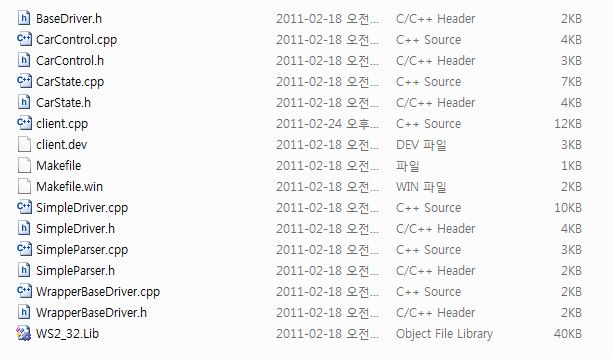
- You need a C++ development tool or IDE (for example, visual studio)
- Include all source files and WS_32.lib to your project
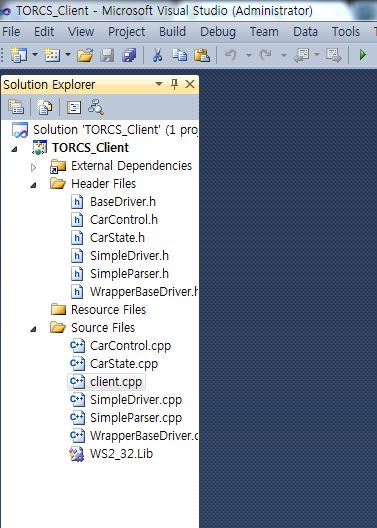
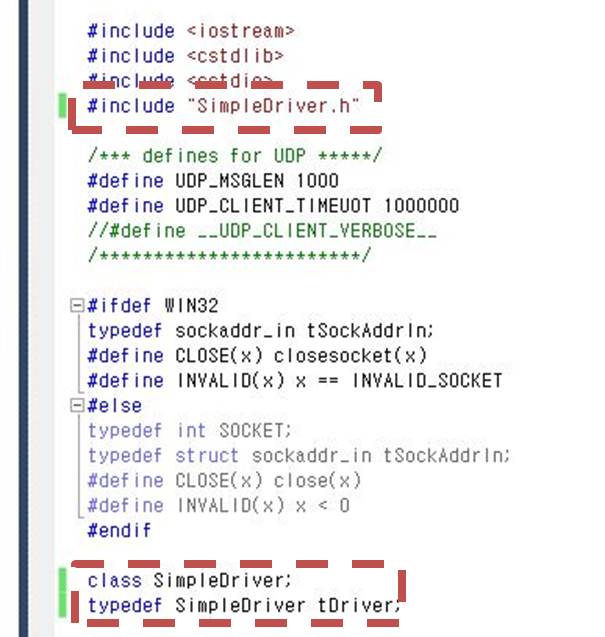
- Please modify client.cpp
- You're ready to build your project. Please run your executables with the following command line options (TORCS_Client.exe host:localhost port:3001 id:championship2011)
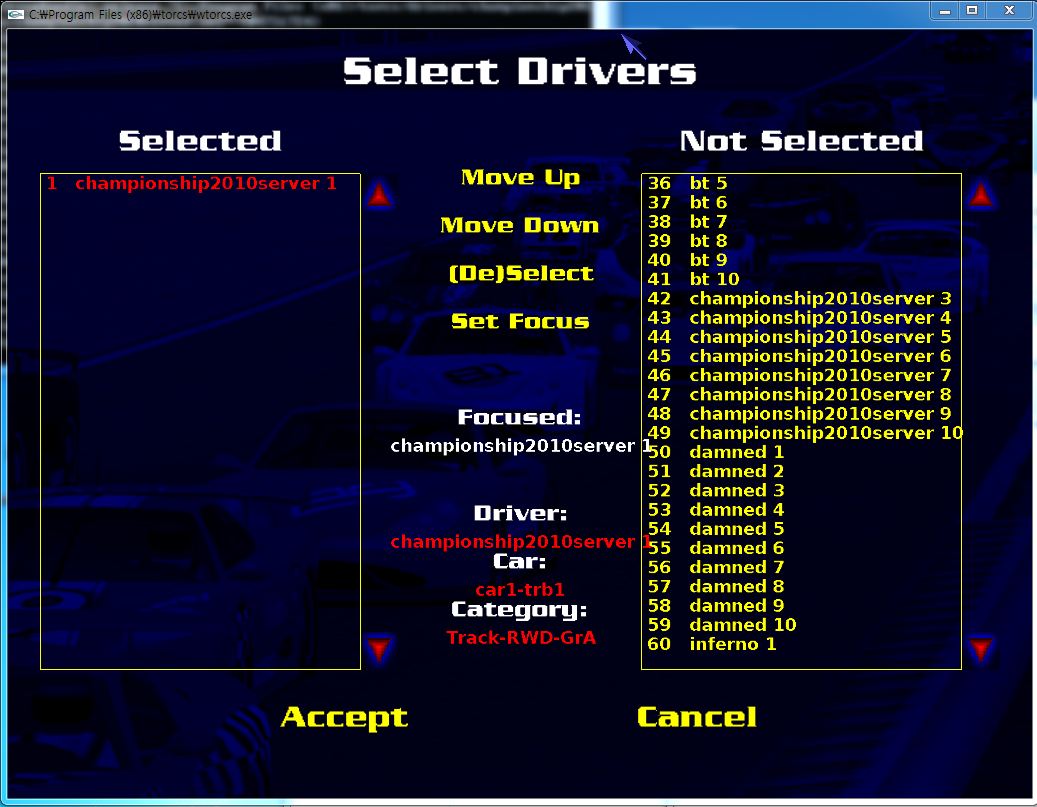
- Run TORCS. RACE-Quick Race-Configure Race- Choose Your Map and you can see the following screen. Please select championship2011server1


주행옵션 설정
주행옵션은 세가지가 있습니다. 맨 첫번째에 임의의 숫자를 넣으면 그 km만큼 달리고 종료됩니다. 두번째 칸에 숫자를 넣으면 그 숫자만큼의 바퀴수를 돌고 주행이 종료됩니다. 세번째는 normal과 result only가 있는데, normal은 주행하는 모습을 볼 수 있으며, result only는 주행 결과만 나옵니다.

주행화면
이제 accept를 누르고 start를 누릅니다. 그러면 TORCS는 맵을 로딩한 후에 무한 대기모드로 들어갑니다. 이상태에서 미리 컴파일해놓은 클라이언트로 접속을 하면 됩니다. 따라가기 대로 해온분이라면 배치파일을 만들었을 겁니다. 그 배치파일을 실행시키면 게임이 시작됩니다. 이제 남은 것은 본인만의 AI를 개발하여 주행시켜 보는 것입니다.


