Hotfix release available: 2026-07-14c "Mort".
upgrade now! [57.3] (what's this?)
Hotfix release available: 2026-07-14b "Mort".
upgrade now! [57.2] (what's this?)
Hotfix release available: 2026-07-14a "Mort".
upgrade now! [57.1] (what's this?)
New release available: 2026-07-14 "Mort".
upgrade now! [57] (what's this?)
Hotfix release available: 2025-05-14b "Librarian".
upgrade now! [56.2] (what's this?)
Hotfix release available: 2025-05-14a "Librarian".
upgrade now! [56.1] (what's this?)
New release available: 2025-05-14 "Librarian".
upgrade now! [56] (what's this?)
Hotfix release available: 2024-02-06b "Kaos".
upgrade now! [55.2] (what's this?)
Hotfix release available: 2024-02-06a "Kaos".
upgrade now! [55.1] (what's this?)
New release available: 2024-02-06 "Kaos".
upgrade now! [55] (what's this?)
Hotfix release available: 2023-04-04b "Jack Jackrum".
upgrade now! [54.2] (what's this?)
Hotfix release available: 2023-04-04a "Jack Jackrum".
upgrade now! [54.1] (what's this?)
New release available: 2023-04-04 "Jack Jackrum".
upgrade now! [54] (what's this?)
Hotfix release available: 2022-07-31b "Igor".
upgrade now! [53.1] (what's this?)
Hotfix release available: 2022-07-31a "Igor".
upgrade now! [53] (what's this?)
New release available: 2022-07-31 "Igor".
upgrade now! [52.2] (what's this?)
New release candidate 2 available: rc2022-06-26 "Igor".
upgrade now! [52.1] (what's this?)
New release candidate available: 2022-06-26 "Igor".
upgrade now! [52] (what's this?)
Hotfix release available: 2020-07-29a "Hogfather".
upgrade now! [51.4] (what's this?)
New release available: 2020-07-29 "Hogfather".
upgrade now! [51.3] (what's this?)
New release candidate 3 available: 2020-06-09 "Hogfather".
upgrade now! [51.2] (what's this?)
New release candidate 2 available: 2020-06-01 "Hogfather".
upgrade now! [51.1] (what's this?)
New release candidate available: 2020-06-01 "Hogfather".
upgrade now! [51] (what's this?)
Hotfix release available: 2018-04-22c "Greebo".
upgrade now! [50.3] (what's this?)
Hotfix release available: 2018-04-22b "Greebo".
upgrade now! [50.2] (what's this?)
Hotfix release available: 2018-04-22a "Greebo".
upgrade now! [50.1] (what's this?)
New release available: 2018-04-22 "Greebo".
upgrade now! [50] (what's this?)
Hotfix release available: 2017-02-19g "Frusterick Manners".
upgrade now! [49.7] (what's this?)
Hotfix release available: 2017-02-19f "Frusterick Manners".
upgrade now! [49.6] (what's this?)
Hotfix release available: 2017-02-19e "Frusterick Manners".
upgrade now! [49.5] (what's this?)
Hotfix release available fixing CVE-2017-12979 and CVE-2017-12980: 2017-02-19d "Frusterick Manners".
upgrade now! [49.4] (what's this?)
Hotfix release available fixing CVE-2017-12583: 2017-02-19c "Frusterick Manners".
upgrade now! [49.3] (what's this?)
Hotfix release available fixing security token and media manager: 2017-02-19b "Frusterick Manners".
upgrade now! [49.2] (what's this?)
Hotfix release available fixing install and media manager issues: 2017-02-19a "Frusterick Manners".
upgrade now! [49.1] (what's this?)
New release available: 2017-02-19 "Frusterick Manners".
upgrade now! [49] (what's this?)
Hotfix release available: 2016-06-26e "Elenor of Tsort".
upgrade now! [48.5] (what's this?)
Hotfix release available fixing CVE-2017-12979 and CVE-2017-12980: 2016-06-26d "Elenor of Tsort".
upgrade now! [48.4] (what's this?)
Hotfix release available fixing CVE-2017-12583: 2016-06-26c "Elenor of Tsort".
upgrade now! [48.3] (what's this?)
Hotfix release available fixing security token: 2016-06-26b "Elenor of Tsort".
upgrade now! [48.2] (what's this?)
This is an old revision of the document!
- Preparation
- Operating Systems:
- Programming Languages:
- Important Documents:
- How to Build Your Own Controller
- Step 1) Preparation
- You need following software to make an unreal bot
- JAVA JDK 6 (32 bit)
- Netbeans 6.9.1
- Maven 3.0.2
- Unreal Tournament 2004(UT2004)
- UnrealEngine2RuntimeDemo(UE2)
- Pogamut 3.2.0
- You can download Netbeans, Maven, Pogamut, UnrealEngine2RuntimeDemo from http://diana.ms.mff.cuni.cz/main/tiki-index.php?page=Download
- You need to buy Unreal Tournament 2004
- Step 2)
- Install Unreal Tournament 2004 (We recommend to run the game once before the next steps)
- Install UnrealEngine2RuntimeDemo
- Install JDK
- Install Maven
- Unzip the package in your drive (for example, d:\maven)
- Add d:\maven\bin to $PATH
- Control Panel → System → Advanced System Configuration → Environmental Variables → System Variable → Path → Edit → add ;D:\maven\bin to the end of the current value
- Add $MAVEN_OPTS to Environmental Variables and set the values as -Xmx1g -Xms512m
- Control Panel → System → Advanced System Configuration → Environmental Variables → User Variable → New → Variable Name: Maven_OPTS → Values: -Xmx1g -Xms512m
- Install Netbeans (Use help→check for update to get the latest release)
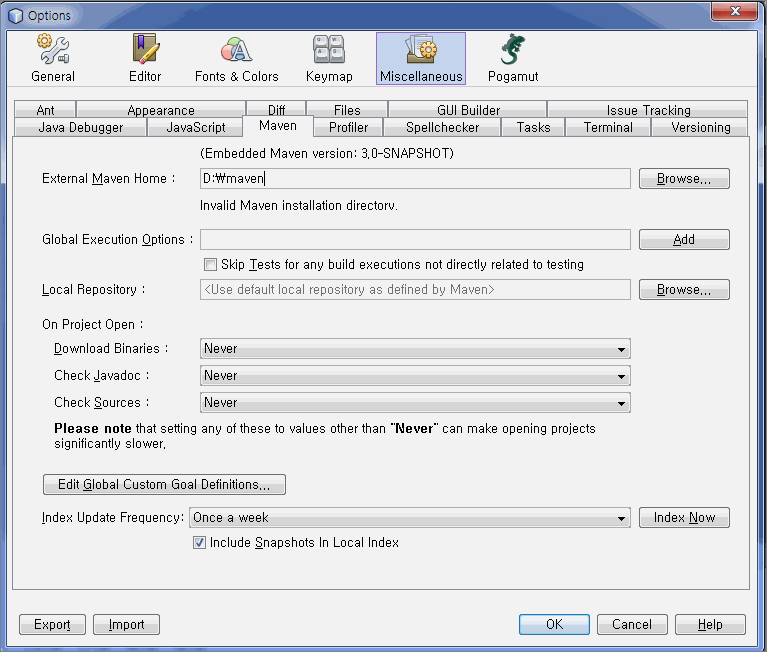
- Maven configuration (Tool→ option→ Miscellaneous→ Maven)
- Set External Maven Home
- Install Pogamut
- Step 3) Create an Empty Bot
- File → New project
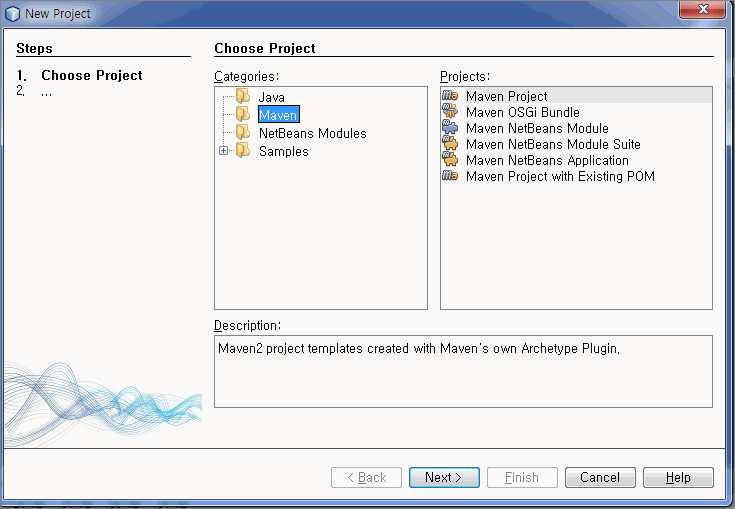
- Choose Maven Project
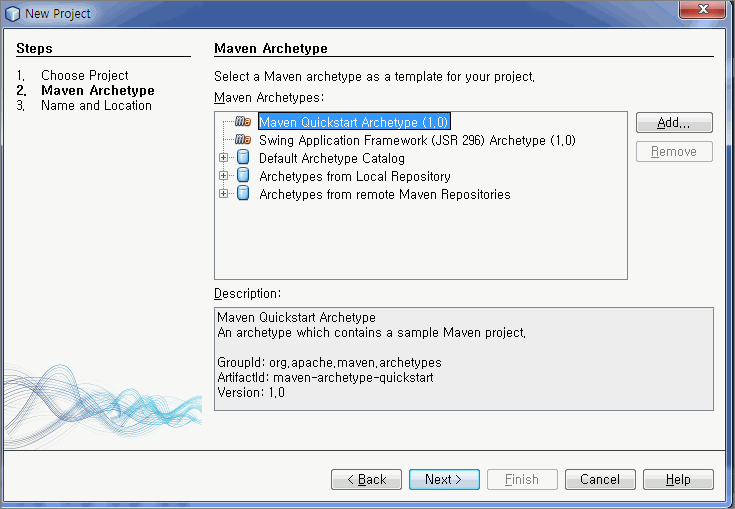
- Choose Add
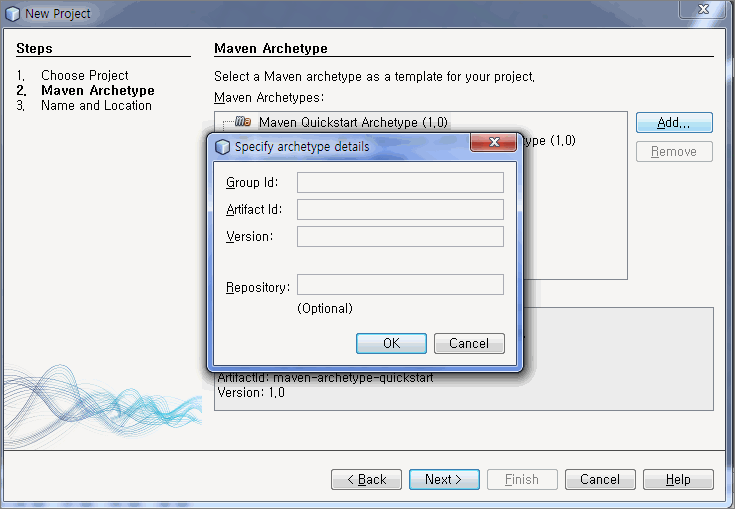
- Enter the following values


| Group ID | cz.cuni.amis.pogamut.ut2004.examples |
|---|---|
| Artifact ID | 00-empty-bot-archetype |
| Version | 3.2.4-SNAPSHOT |
| Repository | http://diana.ms.mff.cuni.cz:8081/artifactory/repo |
- 다른 예제 봇들에 대한 정보는 여기서 찾을 수 있다.
생성한 Custom archtype 선택하고 Next

프로젝트 이름 및 경로 정하고 Finish
서버 설정

프로젝트 탭 옆에서 서비스 탭을 찾을 수 있다. 서비스 탭에 UT2004 servers에서 서버 관리를 할 수 있다. UT2004 servers를 오른쪽 클릭하고 Add server 선택

Server name은 ut2004-local-server 정도로 적당히 입력하고, URI는 localhost:3001 또는 127.0.0.1:3001로 입력한다.
서버를 실행하기 위해서는, UT2004 폴더의 system 폴더에 있는 startGamebotsDMServer.bat을 실행 시킨다. 기본 설치 경로라면은, C:\Program Files\Steam\steamapps\common\unreal tournament 2004\System\startGamebotsDMServer.bat를 실행 시킨다.

위와 같은 화면을 볼 수 있다면 성공한 것이다.


